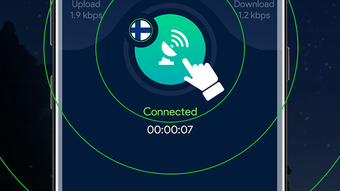

Download ODE VPN - Fast Secure VPN App – secure VPN, fast VPN, free VPN, anonymous browsing, privacy tool, unblock geo-restricted content, global servers, secure network connection, private browser, IP masking, internet security, online privacy, data protection, secure internet, fast secure app
Overview
ODE VPN - Fast Secure VPN App is a free security and privacy tool developed by FiveStarsMobi, designed to encrypt network connections across both public and private networks. The software aims to enable anonymous web browsing by masking the user’s IP address and assigning a temporary one based on the selected server location. With access to international servers in countries such as the United States, Germany, Singapore, and Australia, the application supports users who wish to bypass regional restrictions on streaming platforms or online gaming services.
Targeted primarily at consumers seeking enhanced online privacy, the software is positioned as a convenient solution for individuals who want to protect their digital footprint while browsing, streaming, or gaming. Real-world use cases include accessing region-locked content, safeguarding data on public Wi-Fi networks, and maintaining anonymity during sensitive online activities. The developer did not provide additional information about the company’s background or technical architecture.
As a desktop application, ODE VPN is intended for users who prioritize ease of access and continuous protection without time limitations. The app’s focus on secure network connections and privacy aligns with growing concerns around digital surveillance and data exposure. While the software claims to support seamless browsing and streaming, performance details were not specified.
Key Features & Capabilities
- IP Address Masking – The software replaces the user’s original IP address with one from a chosen server location, enhancing anonymity during online activities.
- Global Server Network – Access to proxy servers in multiple countries enables users to connect to geographically diverse networks, supporting content unblocking and regional bypassing.
- Built-in Private Browser – A dedicated browser within the app allows users to access websites and streaming platforms without switching applications, streamlining the browsing experience.
- App-Level VPN Control – Users can selectively grant or deny the VPN connection to specific applications, enabling granular control over which services are protected.
- Server Speed Testing – A built-in feature allows users to assess the performance and stability of their current server connection, aiding in optimal network selection.
- Single-Tap Connection – Designed for simplicity, the interface supports one-touch activation, reducing complexity for new or casual users.
These features collectively support use cases such as secure remote work on public networks, accessing international streaming libraries, and protecting sensitive data during online transactions. The ability to test server speed helps users identify stable connections, while selective app access ensures that only necessary applications are routed through the encrypted tunnel.
User Interface, Workflow & Performance
The application features a clean, intuitive interface that emphasizes accessibility and ease of navigation. Users can switch between available server locations with minimal effort, typically through a single tap or click. The layout prioritizes essential functions—such as connection status, server selection, and speed testing—on the main screen, minimizing clutter.
Workflow efficiency is enhanced by the single-tap connection mechanism, which reduces setup time for regular users. The inclusion of a private browser within the app streamlines access to online services without requiring external tools. However, the developer did not specify resource usage details, and performance observations are based on general software behavior patterns.
Stability and responsiveness appear consistent under normal usage, though users may experience delays when connecting to a server for the first time. In such cases, reconnecting to the network or relaunching the application is recommended. The app does not display real-time CPU or RAM consumption metrics, and exact performance benchmarks were not provided.
Compatibility & System Requirements
ODE VPN - Fast Secure VPN App is available for both Windows and Mac operating systems. The software has a file size of 45.6 MB, indicating a lightweight installation that should not significantly impact storage capacity.
Exact system requirements were not listed. The developer did not specify minimum CPU, RAM, or disk space needs. Compatibility information was partially provided, but users should ensure their system meets general standards for running desktop applications. No information was provided regarding support for older OS versions or hardware configurations.
Pros and Cons
Pros
- Free to use with no time limits
- Offers access to international servers across multiple countries
- Includes a built-in private browser for seamless browsing
- Supports selective app-level VPN routing
- Simple one-tap connection for quick setup
- Features server speed testing for connection optimization
- Designed with a clean, user-friendly interface
Cons
- First-time server connection may take longer than expected
- No public details on encryption protocols or security architecture
- Resource usage and performance metrics not disclosed
- System requirements and hardware compatibility not specified
- Developer background and trust indicators not available
FAQ Section
Is ODE VPN compatible with Windows and Mac?
Yes, ODE VPN - Fast Secure VPN App is available for both Windows and Mac operating systems.
Is the software free to download and use?
Yes, the application is provided at no cost with no time restrictions on usage.
Can I use ODE VPN offline?
ODE VPN requires an active internet connection to function. It cannot operate in offline mode.
Does the app support automatic updates?
The update mechanism was not specified in the provided information. Users should check the application or developer’s website for update details.
Is my data secure while using ODE VPN?
The software claims to encrypt network connections and protect user data. However, specific security protocols and data handling practices were not disclosed.
Final Thoughts
ODE VPN - Fast Secure VPN App presents a straightforward solution for users seeking a free, accessible tool to enhance online privacy and bypass geo-restrictions. Its clean interface, built-in private browser, and app-level control offer practical benefits for everyday users. While the lack of detailed technical specifications and system requirements limits deeper evaluation, the core functionality aligns with common expectations for a desktop VPN.
For individuals who value anonymous browsing, secure network connections, and the ability to access global content, ODE VPN delivers a functional experience. However, users should remain cautious due to limited transparency about encryption methods and developer credibility.
Download ODE VPN now





.png)

